Folder Tree & Storage Insights
Browse every video across your Mac folders, Photos Library, and external SSDs in a clean hierarchy with real-time format and folder size breakdowns.
LAUNCH30 →

VideoTree is a native macOS AI video manager for Apple Silicon. Browse every video in a folder tree, search scenes, on-screen text (OCR), and spoken words 100% offline, batch compress 4K to HEVC, clean exact & AI-similar duplicates, and trim or merge clips in seconds.
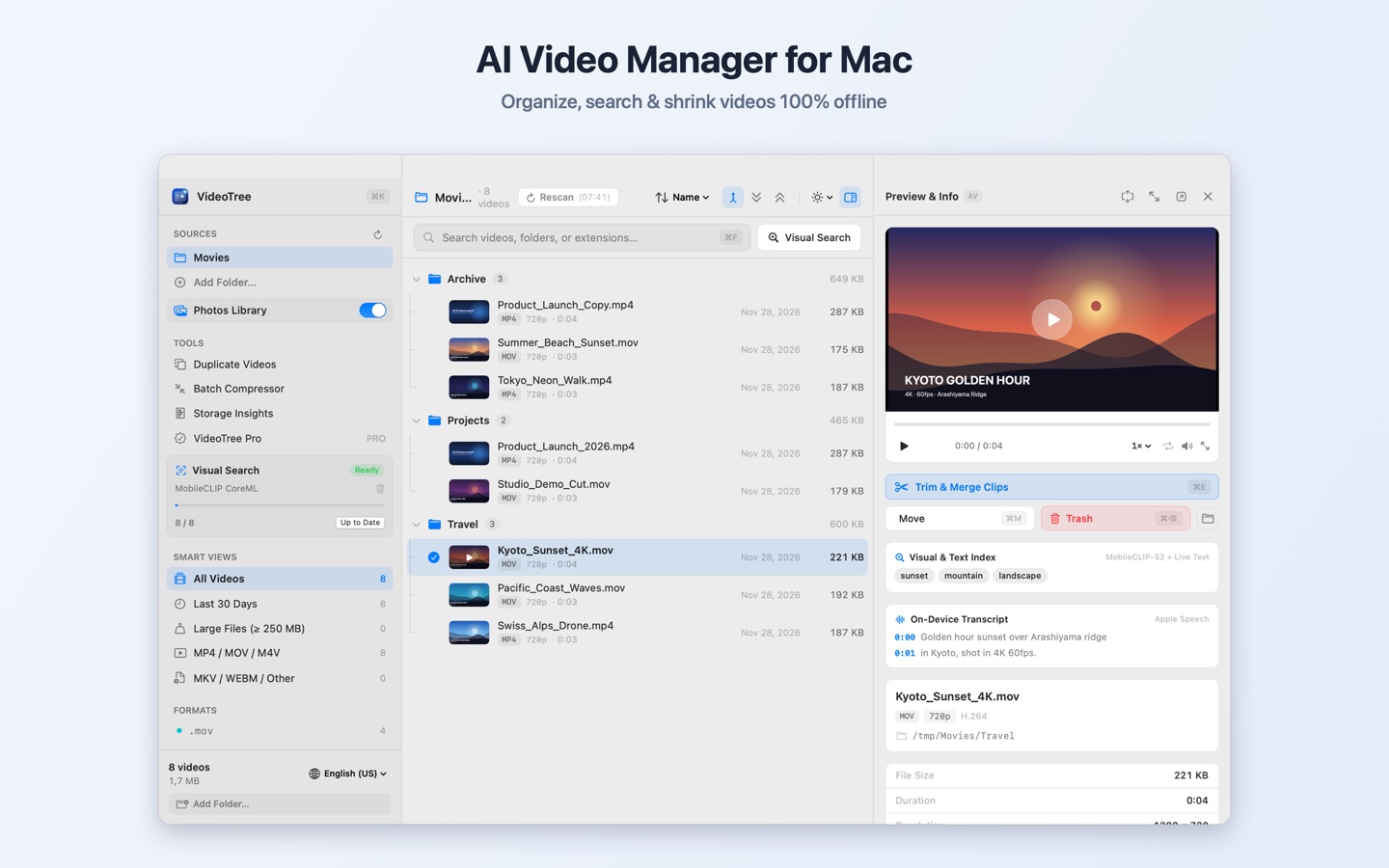
Six essential Mac video workflows unified into one fast, native Apple Silicon app.
Browse every video across your Mac folders, Photos Library, and external SSDs in a clean hierarchy with real-time format and folder size breakdowns.
Powered by Apple MobileCLIP-S2 CoreML, Vision Live Text OCR, and on-device Apple Speech. Jump straight to the exact second a scene, text, or spoken phrase appears.
Shrink whole folders of massive 4K MOV/MP4 videos via Apple Silicon VideoToolbox. Automatically skips files that won't get smaller and moves originals safely to Trash.
3-stage SHA-256 verification eliminates exact copies with zero false positives, while on-device AI visual clustering catches re-encoded WhatsApp and AirDrop duplicates.
Cut out unwanted intros, outros, or middle sections and stitch kept ranges into one clean file in seconds—without launching Final Cut Pro or Premiere.
No accounts, no analytics, no telemetry, no cloud servers. Your personal footage stays strictly on your Mac, and one payment unlocks Pro forever.
Why creators, developers, and Mac power users replace 4 separate utilities with VideoTree.
| Capability | VideoTree (Mac) | macOS Finder | HandBrake | Cloud AI Video Apps |
|---|---|---|---|---|
| Folder Tree + Total Video Sizes | ✓ Instant | Manual | — | Upload required |
| Offline AI Scene, OCR & Speech Search | ✓ 100% Local | — | — | Cloud upload only |
| Batch 4K HEVC Hardware Compression | ✓ 1-Click Safe | — | ✓ Complex UI | Slow / Cloud |
| Exact + AI Similar Duplicate Finder | ✓ SHA-256 + AI | — | — | — |
| Multi-Segment Trim & Merge | ✓ Fast Export | Single trim only | — | Slow |
| Privacy & Pricing | ✓ Private · $19 Once | Private · Free | Private · Free | Cloud · $10–$30/mo |
Try VideoTree free. Upgrade to Pro once and own it forever.
Clear, direct answers about privacy, AI search, HEVC compression, and licensing.
No. Every feature—AI visual indexing (Apple MobileCLIP-S2 CoreML), Live Text OCR, Apple Speech transcription, SHA-256 duplicate scanning, trimming, and HEVC compression—runs 100% locally on your Apple Silicon Mac. Zero bytes leave your device.
Yes. VideoTree offers two modes: Exact Copies (3-stage SHA-256 hashing with zero false positives) and Similar Videos (AI), which compares visual embeddings to find re-encoded, resized, or compressed copies and automatically suggests keeping the highest-resolution original.
VideoTree uses Apple VideoToolbox hardware HEVC encoding and compares file sizes after each clip finishes. If a video wouldn't become smaller, it is skipped automatically. When using Replace Original, the original clip is moved safely to macOS Trash rather than permanently deleted.
VideoTree is built natively in Swift and SwiftUI using Apple's built-in AVFoundation, VideoToolbox, Vision, and Speech frameworks—with zero Electron or bundled Python runtime. The optional ~193 MB Apple MobileCLIP-S2 CoreML model is downloaded on-demand only if you enable Visual Search.
Never. VideoTree Pro is a $19 one-time lifetime purchase—whether you buy through the Mac App Store or via a Direct Web license key.
All Apple Silicon Macs (M1, M2, M3, and M4 series) running macOS 14 Sonoma or later. Available natively in English (US), Japanese (日本語), and German (Deutsch).